Salesforce Release Management & Governance
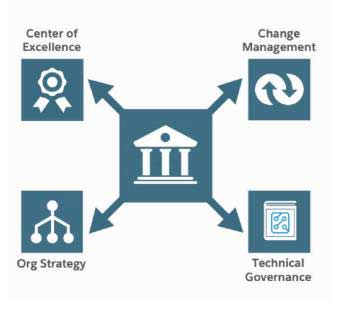
Components of a Framework for Lean Governance
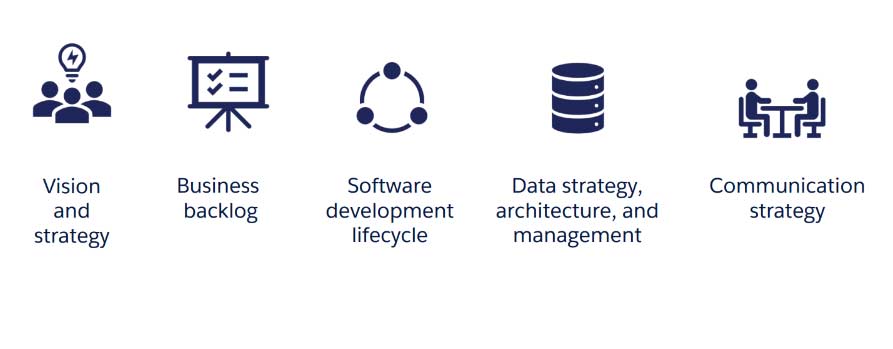
Key components
- The governing body that develops and oversees Salesforce strategies is the Center of Excellence (CoE).
- Methods for overseeing the complete program or project lifecycle, including gathering business requirements and transferring code from development to production
- Creating and organizing the fundamental “Orgs,” or spaces, in which the client’s Salesforce apps will reside and function
- Guiding concepts for efficiently creating Salesforce’s technological features
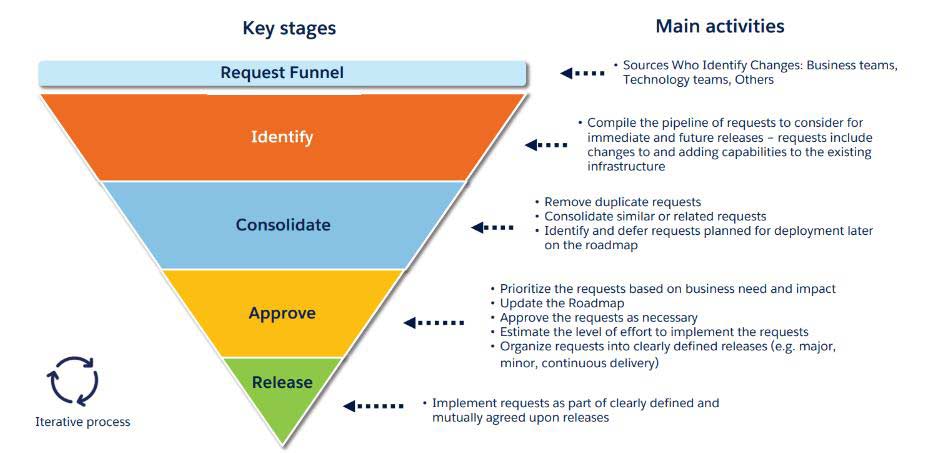
Stages of Change Management
Best practices for release management
- Releases cannot conflict with Salesforce releases, which occur three times a year and are announced at https://trust.salesforce.com/trust/calendar.
- If a Salesforce release takes place between application development and production deployment
- Testing ought to be conducted either
- On preview sandboxes with the latest release activated
- on a sandbox that has been updated following the production instance’s deployment of the new Salesforce version.
- To maintain the preview sandboxes, manual code migration may be required across environments.
- Releases need to be well-documented. The following must be included in the release manifest:
- Details about every component that will be implemented (added, modified, or removed) as part of the release, connected to user stories
- Every deployment-related step, both automated and manual
- For future reference, release packages need to be backed up either:
- A specific storage area AND/OR
- The deployment tool AND/OR
- In the code versioning system
- If you’re using partner apps, be aware of the partner release schedules and upgrade procedures. The release manager, who is appointed to each organization, can only refresh, delete, or create sandboxes.
- Unless continuous deployment is in place, only the release manager deploys to production.
- Always perform a validation (test) only deployment before moving to production; if it goes well, proceed with the actual deployment.
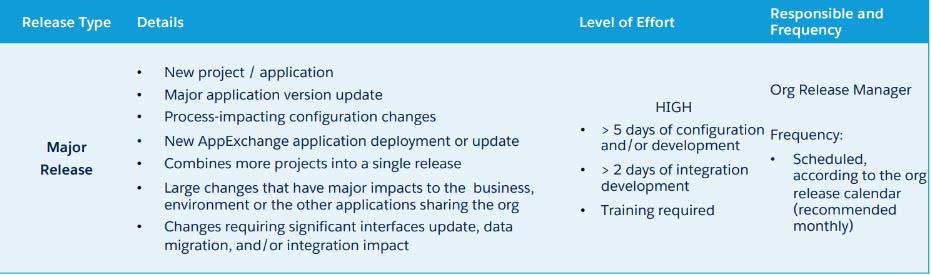
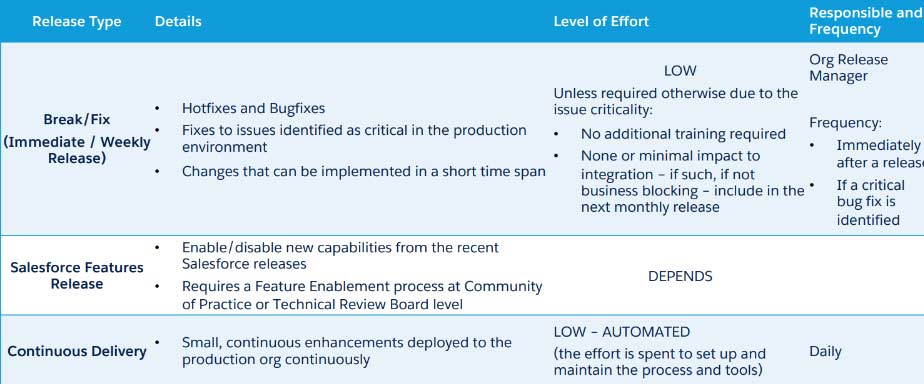
Release Types (1 of 3)
Release Types (2 of 3)
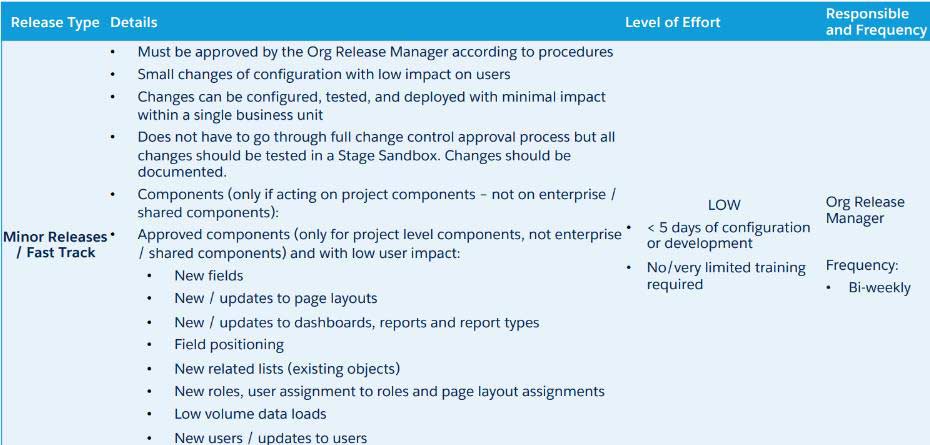
Release Types (3 of 3)
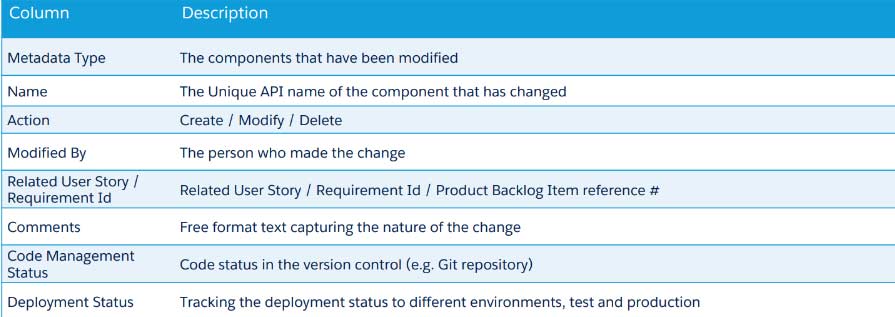
Release Tracking
Ideally, the instruments utilized will accomplish this automatically. If not, it should be a shared document that the accountable team members can update regularly. It should, at the very least, contain the details listed below.
Procedures for Production Deployment (high level)
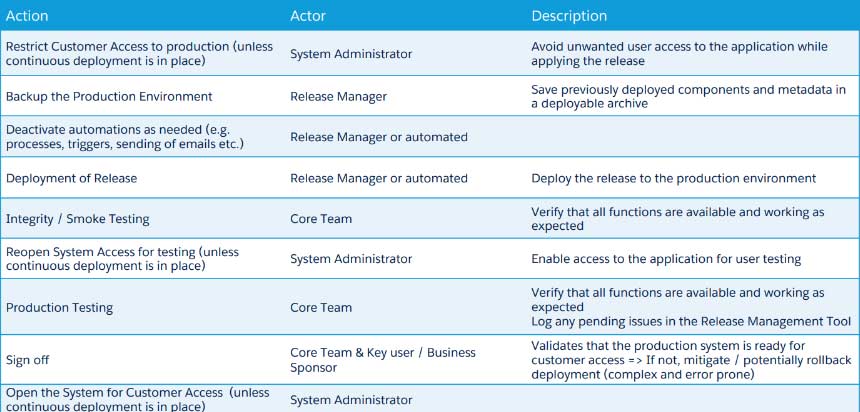
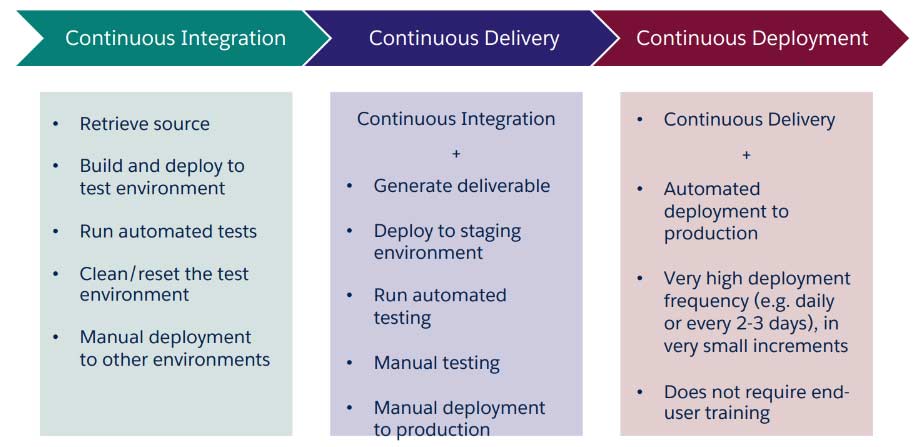
From Change Sets to Ongoing Delivery and Integration
What makes it a smart idea?
- Capacity to manage parallel development with dispersed teams and developers
- Release cycles can be shortened and release frequency increased;
- Code migration and deployment between multiple environments can be automated; deployment package components can be traced more thoroughly;
- Code analysis and testing can be automated; conflicts can be identified early;
- Errors are less likely to occur; and traceability from user stories to configuration components and deployed components of a release can be ensured with less manual intervention and effort.
Unit Testing
As a component is being developed, the developer tests each unit of code to ensure that the functionality functions as expected in both positive and negative scenarios and in relation to other components. Salesforce used unit testing to enforce 75% code coverage.
Functional Testing
Conducted by business-savvy users, it assesses whether functional requirements are executed correctly and doesn’t necessitate familiarity with the developed code.
Systems Testing
The team tests the application from beginning to end, which may be carried out by a specialized testing team. It assists in determining whether the business, functional, technical, and any non-functional requirements are correct.
Testing on the Salesforce platform (2 of 3)
Regression Testing
The primary goal of regression testing is to confirm that the system still satisfies its requirements and that modifications to the environment or application have not had any unanticipated negative side effects. It is strongly advised that it be automated and done whenever there are updates.
System Integration Testing
System Integration Testing o A process that assesses the software’s interoperability and mode of operation when it is integrated with other systems o Can necessitate significant effort and cross-team collaboration o Requires the availability of testing environments (or mock methods) for the connected systems
Testing for User Acceptance
The final stage of the QA testing phase’s goal is to make sure the solution performs as intended and is user-friendly. These tests must be carried out by users who possess business expertise.
Testing on the Salesforce platform (3 of 3)
Performance Testing
Performance Testing should be carried out using particular tools, and the performance KPI monitored. Salesforce should be informed beforehand by raising a specific support case outlining the need, plan, timeline, and testing methodology Areas subject to potential performance issues must be identified, and performance KPIs defined
Data migration testing
Partial and complete data migration testing should be carried out on data migrations o It must be carried out from a technical as well as functional and quality standpoint.
Smoke Testing
Smoke testing, often referred to as “Build Verification Testing,” is a non-exhaustive set of tests designed to ensure that the most crucial features operate as intended. The testing’s outcome is used to determine whether a build is stable enough to proceed with additional testing.
Conducted at several points during development and deployment, including in the production organization following a release’s deployment.