

Enterprise Integration Patterns
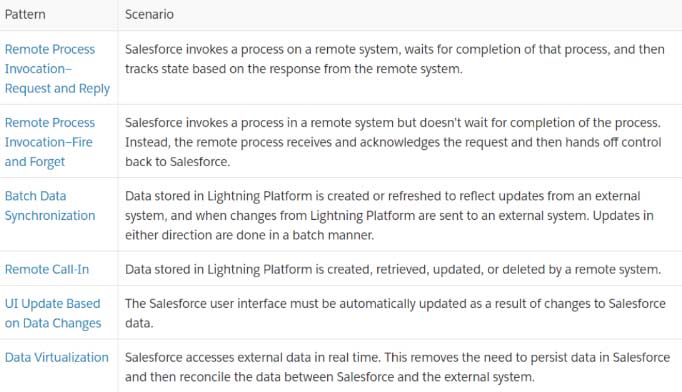
What are the six Enterprise Integration Patterns?

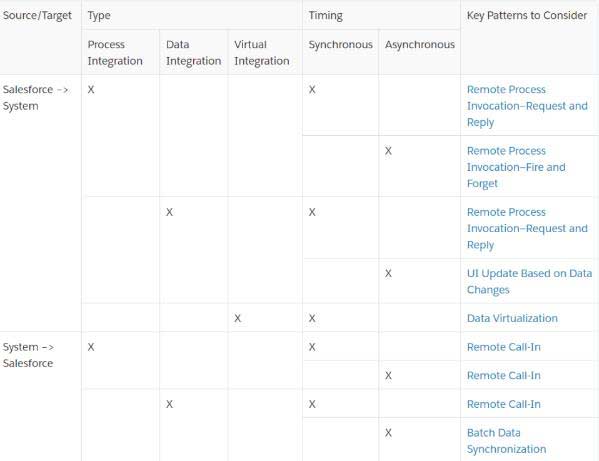
Questions about pattern selection
- Who started it? Source and Target of Identity
- What kind of integration is it?
- What Time Is It?
Pattern Selection Matrix
What are the best ways to read the pattern?
- Background
- Issue
- The Powers
- Resolution
- Illustration
- Outcomes
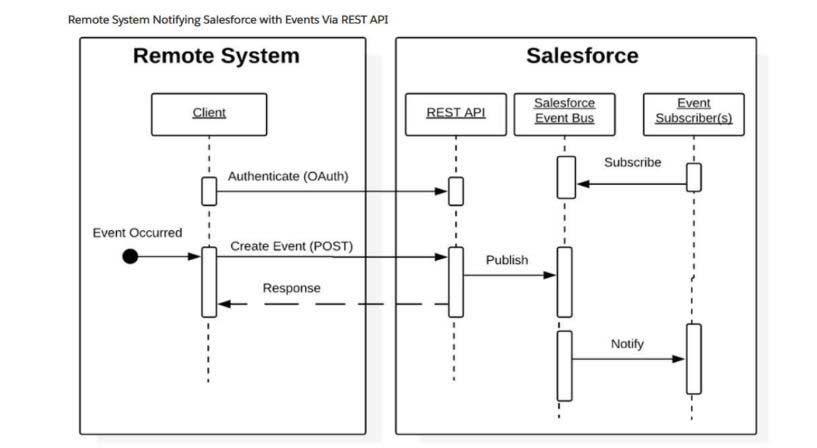
Remote Call-In Enterprise Integration Patterns 1
A remote system creates, retrieves, updates, or deletes data stored in the Lightning Platform.
Remote Call In-Scenario 1

Remote Call In-Scenario 2
Enterprise Integration Patterns 2: Request and Response for Remote Process Invocation
Salesforce initiates a procedure on a remote system, waits for it to complete, and then monitors the status based on the response from the remote system.
Request and Response for Remote Process Invocation


Enterprise Integration Patterns 3: Fire and Forget Remote Process Invocation
Salesforce initiates a procedure in a remote system without waiting for it to complete. Rather, the remote process returns control to Salesforce after receiving and acknowledging the request.
Remote Process Invocation: Scenario 1: Fire and Forget
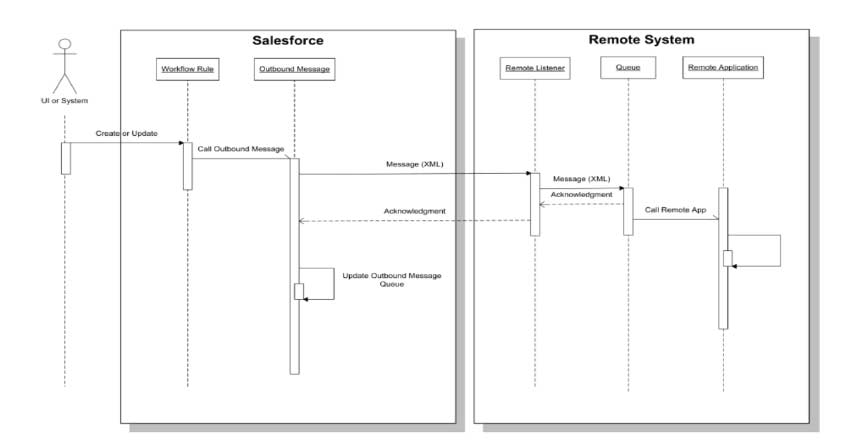
Scenario 2: Remote Process Invocation- Fire and Forget
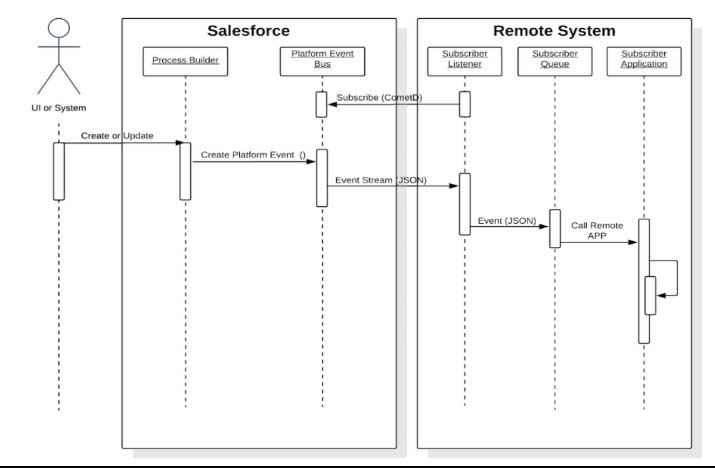
Outbound Messaging
- It is delivered to a designated endpoint.
- It can be made secure; it supports SOAP.
- It provides dependability. If the remote system does not provide a positive acknowledgment, the procedure attempts again for up to 24 hours.
- Messages are transmitted asynchronously and without using the Salesforce user interface.
- This approach becomes a “first-mile” delivery guarantee when using middleware.
- The mechanism is declarative.
Issue with Batch Data Synchronization
Given that these imports and exports include a lot of data and may disrupt end-user activities during business hours, how do you import data into Salesforce and export data out of Salesforce?
Modify the Remote Master Data Capture
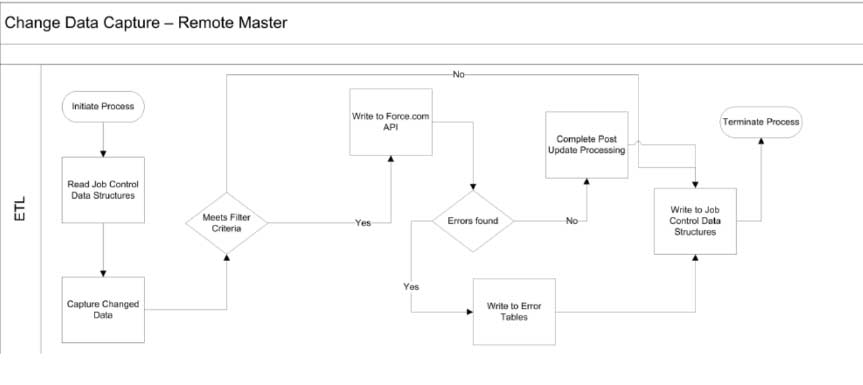
Salesforce Master’s Change Data Capture


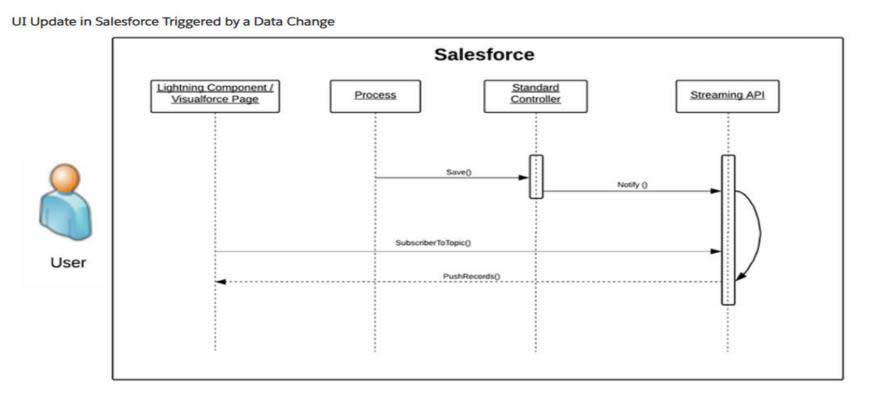
Enterprise Integration Patterns 5: Update the User Interface in Response to Data Changes
Changes to Salesforce data necessitate an automatic updating of the Salesforce user interface.
UI Modification in Response to Data Change
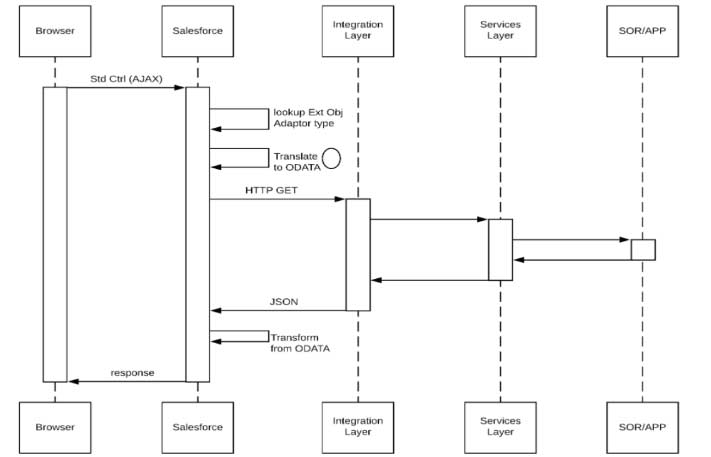
Data virtualization is the sixth integration pattern.
- Salesforce uses this technique to get real-time access to external data.
- This eliminates the requirement to reconcile data between Salesforce and the external system once stored in Salesforce.
Data Virtualization
Integration Tools
- SOAPUI
- Workbench
- Curl
- Postman
- Emp Connector
- Mulesoft
