
Salesforce Data Modeling
Data Model – Agenda and Objectives
- Add Objects
- Add Fields
- Data Types
- Add Relationships
- Consider Cardinality
- External Data
Consider Your data Tiers (Object Classification)
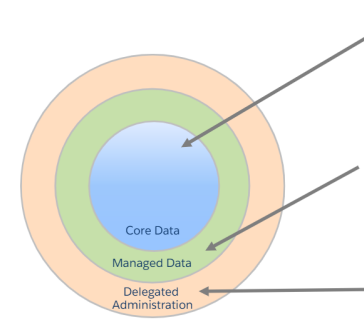
Core Layer
-
Objects of the Enterprise Class
-
Several LOB
-
Difficult Business Procedure
-
Apex and Complex Workflow
-
Data Managed by IT
-
Massive volumes of data (such as accounts, users, tasks, and sharing objects)
Layer of Management
-
Objects of the Enterprise Class
-
One LOB
-
Complex Business Procedure
-
Apex and Complex Workflow
-
Volumes of Medium to Large Data
-
Business Managed Data (such as Custom Objects, Cases, and Opportunities)
Layer of Delegated Administration
-
Objects of the Non-Enterprise Class
-
One LOB
-
Spreadsheet apps: a straightforward or nonexistent workflow
-
No Personalized Code
-
Data Volumes That Are Small to Medium
-
Metadata and Business Managed Data (e.g. Custom Objects)
Logical Data Model
- Create a logical data model first.
- Don't consider the actual implementation.
- Take note of the entities
- Record the connections
- Record the cardinality.
Physical Data Model Implementation
- Features and Construction of the Overlay Platform Standard Objects Are
- Standard Objects Override
- Person Accounts
- Data Partitioning by Record Types
- Custom Objects definition
- What direction is the flow of data?
- Emergence of Integration Patterns
- Scalability and data volumes are essential.
Data Modeling in Salesforce
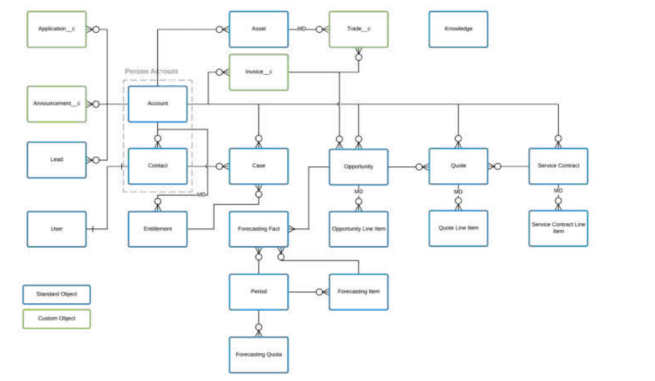
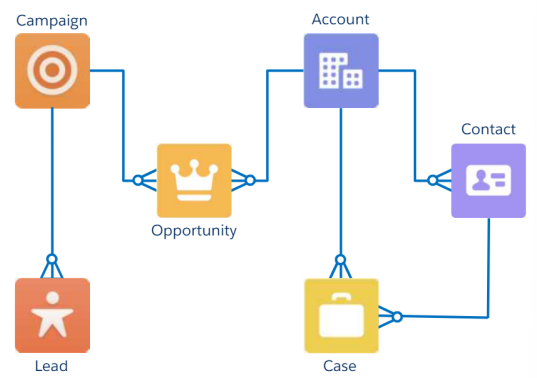
There are fundamental schema components, as demonstrated by the “Sales Objects” Data Model:
- Standard objects
- Standard relationships between those items
Custom vs. Standard Objects
Considerations for Standard Objects:
-
They are already built.
-
They have defined relationships.
-
Partially customizable.
-
Purpose is established.
-
Reporting is already available.
Considerations for Custom Objects:
-
Must build out completely.
-
Relationships must be established.
-
Fully customizable.
-
Purpose can be defined.
-
Custom Report Types may need to be built.
Standard Object and Field Customization
A predetermined set of fields is included in all standard objects to collect common business data. Field-level security can make them invisible, but they cannot be removed.
- Modify the field and tab labels
- Include a help text and add or modify values in picklists.
- Include lookup filters.
- Lesforce.com
- Create a field history tracking account.
- Modify the auto-number format
Object Relationships
Definition: Object relationships establish connections between objects.
Types of relationships can impact:
- Erasure of data.
- Keep track of access.
- Fields that are required.
- Lookup
- Master-Detail
- Self
- Hierarchy
- Many-to-many
- External and Indirect
Lookup Relationships
Definition: Lookup connections Connect two items loosely.
- Links an object with another standard or custom object.
- Links an object with itself (called a Self Relationship).
- Independent ownership and sharing.
- Parent record is required or optional.
Three delete behaviors if a parent record is deleted:
- Clear the value of the parent field (not available when lookup field required).
- Don't allow deletion of the lookup record that's part of a lookup relationship.
- Delete child records also (cascade delete).
Master-Detail Relationships
- Master-detail connections Connect two objects "tightly."
- Connects one standard or custom object to another.
- Re-parenting is not required.
- Parent objects manage sharing and ownership.
- A parent's record is necessary.
- If a parent record is destroyed, there is one delete behavior:
- Additionally, erase child records (cascade delete).
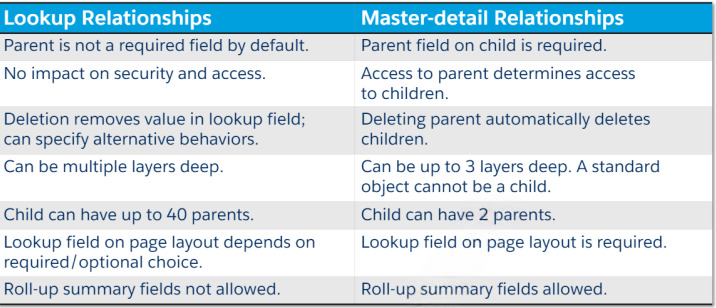
Lookup vs. Master-Detail Relationships
Self-Relationships
Permits a record of the same item to be referenced by another record. made using a lookup connection
The concepts of ownership, sharing, and deletion are all the same as lookup relationships.
Hierarchical Relationships
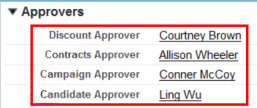
- Creates a link between two user records.
- Purely for user-to-user communication.
- Frequently employed in approval procedures.
External Objects
With the exception of mapping to data kept outside of your Salesforce organization, external objects are comparable to custom objects.
- Depend on the definition of an external data source.
- Data tables are mapped to objects.
- Table columns are mapped to fields.
- Can allow users to search, read, create, update, and delete
External and Indirect Lookup Relationships
Definition: Salesforce items are connected to external objects using indirect and external lookup connections.
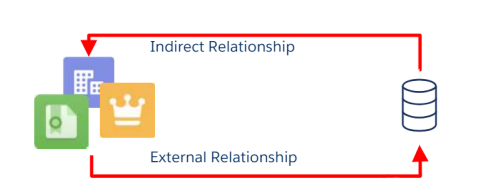
- A child standard, custom, or external object is connected to an external object through external relationships.
- An external object is connected to a parent standard or custom object through indirect relationships.
Many-to-Many Relationship
Definition: Every record of one object can be connected to numerous records of another object through a many-to-many relationship, and vice versa.

Junction Object
Definition: A junction object implements a many-to-many relationship and is the offspring of two master-detail relationships.
- The main object exercises control over ownership.
- The most controlling parent is in charge of OWDS.
- When either related master record is removed and put in the Recycle Bin, junction object records are also removed.
- Should both related master records be removed,
- The junction object record is permanently erased and cannot be recovered.
Take into account the following when constructing a junction object:
- Give the item a label that explains its function.
- Make use of the data type auto-number.
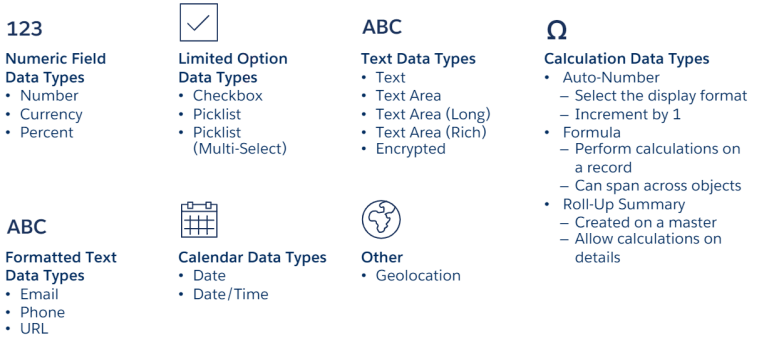
Field Types
Schema Builder
Definition: A tool called Schema Builder offers a dynamic environment for seeing and changing every item and relationship in your application.
- Lookup and master-detail relationships, fields and relationships for standard and custom objects, field values, and necessary fields are all visible.
- By dragging and dropping, you can add new custom objects, custom fields, and relationships.
- When you relocate an object, the schema layout automatically updates.
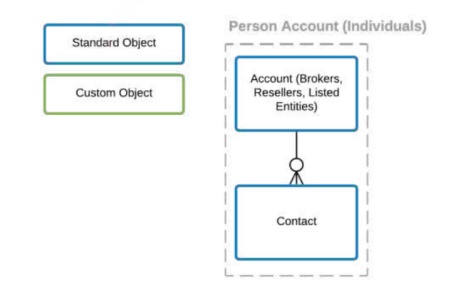
Accounts & Contacts
Brokers are businesses.
Corporations are listed entities.
Any stock reseller that collaborates with USE’s BDMs is open to individual traders. rce.com
Data Model – Accounts
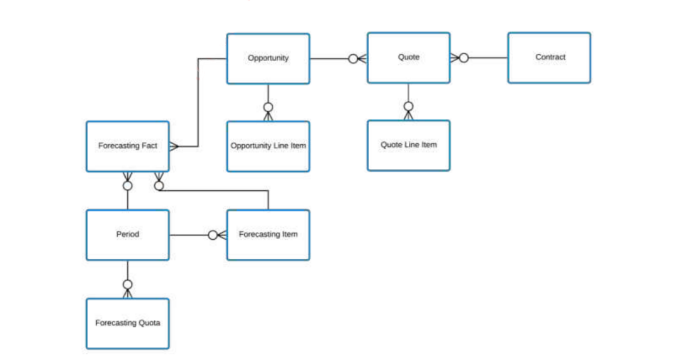
Sales Objects
BDMs and resellers work together to market hardware devices to USE’s clients.
Together with BDMs, resellers asked for […] bids.
The management of USE has asked for better opportunity forecasting.
BDMs are grumbling about the sporadic assignment of leads.
Data Model – Sales
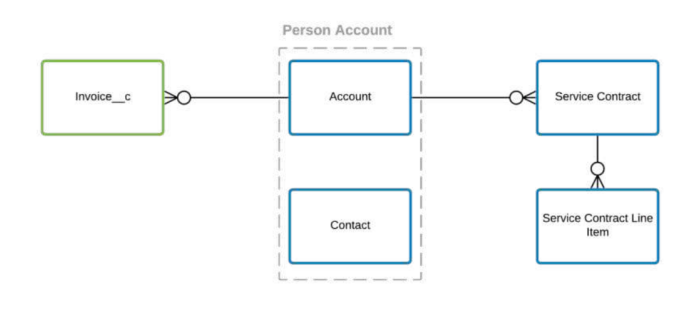
Contracts and Financials
… application that is monitored prior to approval and contract conversion.
Broker-USE contracts specify the length, trade discounts, SLAs, and hosted equipment.
Monthly invoices are created, combining all customers.
provide executives with a summary of open versus closed bills for the current fiscal year by e.coles activity for each…
Data Model – Contracts and Financials
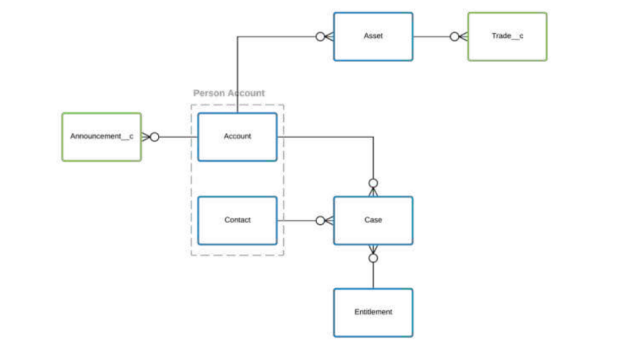
Service,Traders & Announcements
USE wishes to guarantee the routing of service requests.
SLAs must be strictly followed by the service team.
After being listed, companies are required to submit announcements to the market. People want to be able to view every trade they have made against each other.
Data Model - Service,Traders & Announcements
Data Model – USE
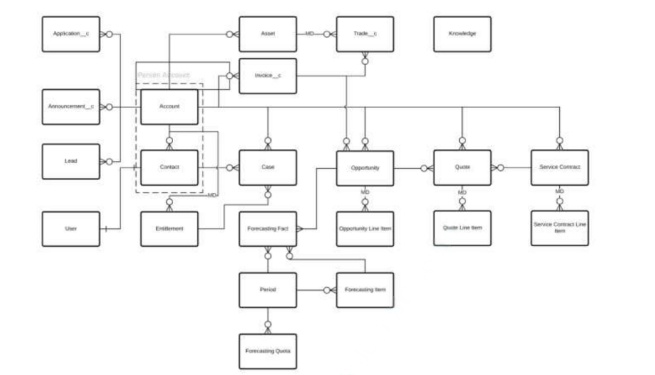
Data Model – Color Coding