

Manage Large Data Volume in Salesforce
What are Large Data Models?
- More than 50 million registros de administración
- More than 20 million registros de contacto
- 100s de millions de registros de Custom Object
- 10s de cientos de usuarios
- 100s de GB de total almacenamiento de datos (no incluyendo documentos y attachments)
- ORCE.co
Why You should Care about Large Data Volumes?
- Time durations of slow search (< 5 seconds)
- Incremented List visits and Response times to Report
- Problemas de rendimiento en la integración de datos con la data
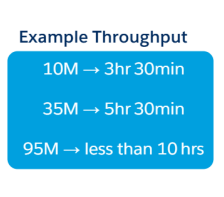
- API Throughput Capacity
Key Data Operations
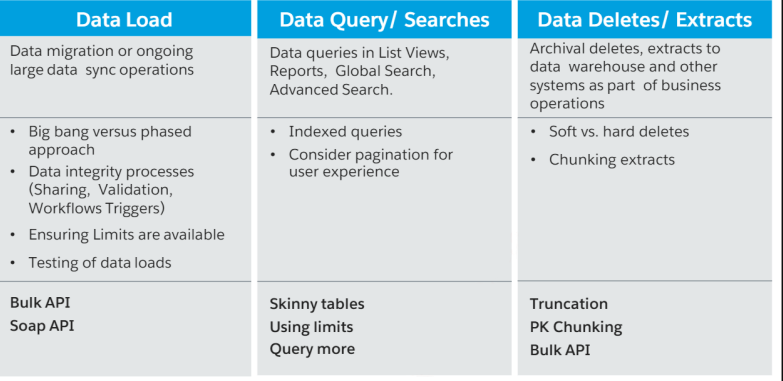
Information you need in order to identify and manage LDV
Data Volume Analysis
- One-time loads versus synchronization;
- Immediate, hourly, nightly, weekly, and monthly
- synchronization requirements;
Processing Capability of the Source System;
- Salesforce Governor Limits;
- Processing Limitations of the External System
What Data-Driven Activities Take Place in SFDC:
- Workflow Guidelines
- Triggers
Areas of Discovery
- Note counts (according to the size recommendations).
- Number of Users
- API Calls
- Initial Loads vs Continual Additions/Changes
- Is the data separated by nature?
- How will the data be accessed by end users?
- Read-only
- Must be created
- Must be edited
- Must search/sort
- Related lists
Data Model – Data Volumes

Advanced Data Concepts
Large Data Volume Considerations
Standard and custom indexing
Large Items Archiving Off Platforms and Skinny Tables
Bulk API for Analytics Only Data Loading & Integration
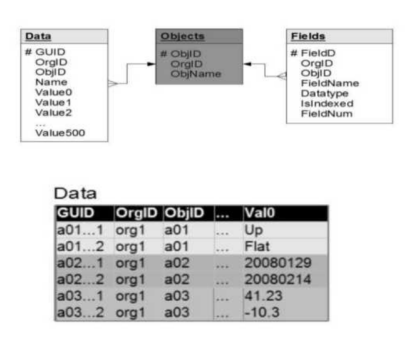
Salesforce Data Storage Uncovered
Metadata tables are used to track customization.
Standard and custom objects are kept apart, and custom fields on standard objects are tracked independently.
Salesforce Data Storage Uncovered (Cont.)
- Metadata regarding custom fields (columns)
- Custom objects (tables) are stored in the Fields and Objects tables, respectively.
- All structured data pertaining to custom objects is stored in the Data Heap table.
- Multiple data kinds that come from distinct objects can be stored in a single slot.

How to Make our Queries Fast?
- The indexing of certain fields improves query performance.
- Division
- Created Date
- Systemmodstamp (LastModifiedDate)
- Record TypeId
- Name and email address (for leads and contacts)
- Lookups and master-detail are examples of foreign key connections
- The primary key for every item is the distinct Salesforce record ID
- External IDs (text, email, number, or auto number)

Additional Indexing Considerations
- With the exception of multi-select picklists, text areas (long), text areas (rich), non-deterministic formula fields, and encrypted text fields, custom indexes can be enabled for custom fields.
- Null records (records with empty values) are not included in the index tables.
- Create custom indexes with null rows in collaboration with Salesforce Customer Support.
- Two custom indexes
Query Optimization
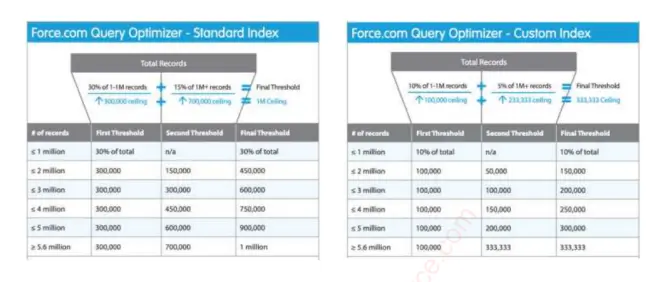
Query Optimization – Index Selectivity Exceptions

What are Skinny Tables?
Salesforce was developed and maintained.
Avoid joining the custom and standard fields.
Remained in agreement with the master table.
Don’t include records that have been soft-deleted.
accessible for Account, Contact, Opportunity, Lead, Case, and custom objects

PK Chunking
- Using the Primary Key (SF ID), the platform automatically divides queries into smaller sets and runs them in distinct batches. The Bulk API (Sforce-Enable-PKChunking: chunkSize=250000) supports it.
- Suitable for most standard objects and all custom objects; • Supported for the majority of shared tables; • Allows for normal filtering within chunks using the WHERE clause: chunking on the parent object

SOOL vs SOSL
Utilize SOQL when
- You are aware of the fields or objects that contain the data
- One object or several related objects are the sources of the data you wish to get.
- The number of records that fit the given criteria is what you wish to count.
- As part of the query, you wish to sort the results.
- You wish to extract information from checkbox, date, or numeric fields.
Employ SOSL when
- You want to locate the data as quickly as possible, but you are unsure of which object or field it is located in. You wish to efficiently retrieve a number of objects and fields, some of which may or may not be connected
- You wish to use the divisions feature to retrieve data for a certain division inside a company, and you want to locate it as quickly and effectively as possible.
SOQL Best Practices
- Selective queries
- Indexes and the Skinny Table
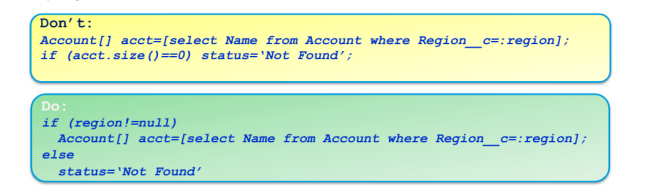
- Use "null" sparingly
- Full table scans are caused by nulls. For null, use a value. Avoid using a null in your query:

Bulk API
The Salesforce API is optimized for processing over 100,000 records and is built on REST principles. Batches of 10,000 records are transmitted asynchronously to Salesforce.
Setup allows for the monitoring of background operations.
- PK Chunking is available for very big data queries
- The API still processes 200 records at a time in a "batch"
- Data loaders or commercial ETL tools are frequently used to access it

Large Data Volumes Requirements
People want to examine the performance of their assets as well as all of the trades they have made against each organization over the past 12 months.
In order to determine the offer specials, TradeUS must use an external data feed that includes the preferences of every trader and the history of support cases for a subset of traders. Both standard and custom fields are included in the required data.
A list view that displays all active and closed cases for their region (custom field) arranged by resolution time (custom field) was requested by service agents.
- Large Data Volumes Requirements – Solution 1
People want to examine the performance of their assets as well as all of the trades they have made against each organization over the past 12 months. Provide an archiving solution because the deadline is set.
- Large Data Volumes Requirements – Solution 2
In order to determine the offer specials, TradeUS must use an external data feed that includes the preferences of every trader and the support case history for a subset of the traders. Both standard and custom fields are present in the required data.
→ The query performance will be significantly increased by using two SOQL queries and creating Skinny Tables for Account and Cases.
- Large Data Volumes Requirements – Solution 3
A list view that displays all active and closed cases for their region (custom field) arranged by resolution time (custom field) was requested by service agents. Suggest a two-column index where the primary index is region and the secondary index is resolution time.
Data Lifecycle & Management
Data Preparation
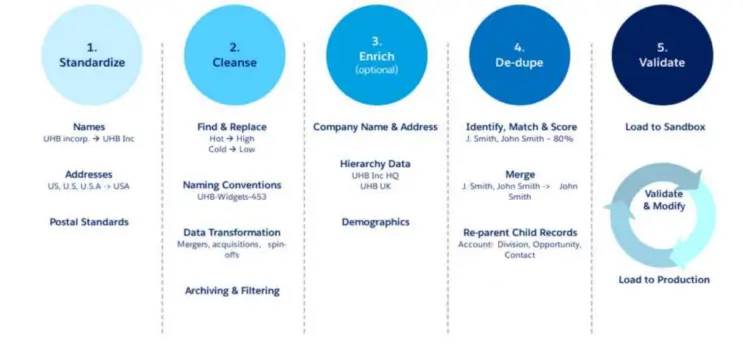
Data Migration Plan and Tips
Plan: What must be moved, who must do it, when must it be done, and how
- Select Your Tools for Transformation
- Data Loader (no transformation)
- ETL
- Apex: Postpone Sharing Calculations
- Is it possible to deactivate triggers?
- Is it possible to deactivate workflows?
- Is it possible to deactivate validation rules?
- Is it possible to deactivate process flows?
- Is it possible to divide the data into sets?
- Can delta loads be handled by the data conversion?
