

How to Implement Single Sign-On with Salesforce
Salesforce Identity: What is it?
Salesforce authentication offers Web and mobile applications authentication and access management services:
- Make applications more accessible by using single sign-on.
- Make administration easier with the Salesforce point-and-click interface, which includes consolidated reports and configuration.
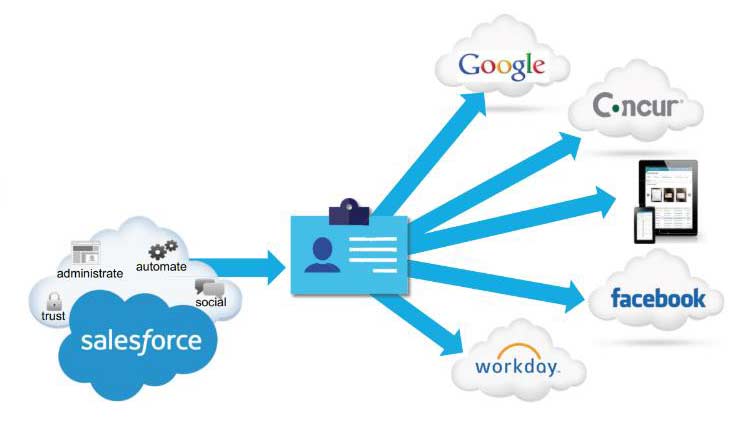
Single Sign-On (SSO): What is it?
Definition: Single Sign-On (SSO) is a procedure that enables network users to access all permitted networks with a single password, eliminating the need to log in to each resource individually.
Advantages of SSO
- Cut down on administrative expenses
- Since all user authentication data is stored in one location, there is less need to track, maintain, and potentially synchronize multiple databases.
- A decrease in user support requests about passwords
Extra Advantages of Single Sign-On
A rise in adoption
- Users save time by having a single username and password that allows them to access Salesforce and all business resources with ease.
- Lessens the tiredness associated with passwords
Increased protection
- Policies regarding corporate network passwords will also apply to Salesforce.
- Single-use authentication credentials and automatic user provisioning
- De-provisioning guards against unauthorized access.
Who is in charge of authenticity?
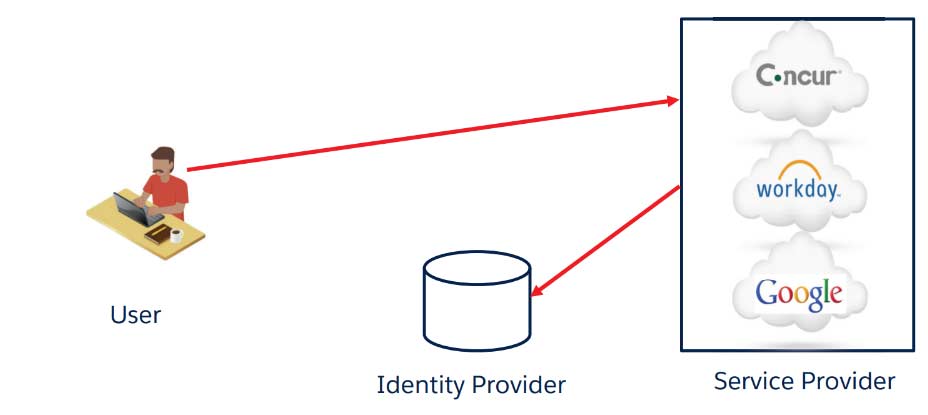
Service Provider (SP): a readily available business application
Identity Provider (IdP): the authentication server
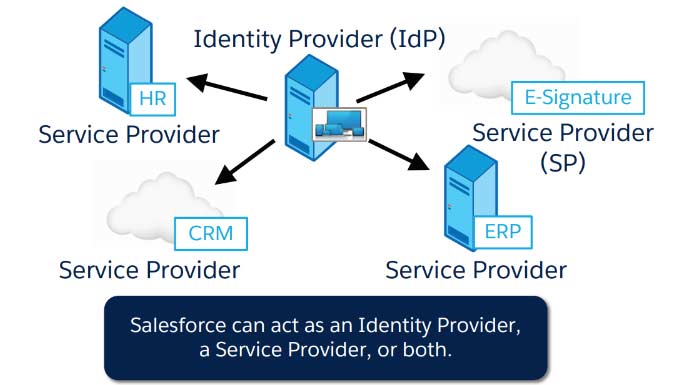
Salesforce Identity: Essential Features of the Service Provider
One-time login using
- SAML
- Delegated Authentication
- OpenId Connect
“Bring your individuality.”
- Active Directory connectivity is made possible by Salesforce Identity Connect permission set licenses.
- Social identities: Well-known public providers like Google, Facebook, Amazon, and Paypal allow users to log in.
Just-in-Time Provisioning
- When using SAML, Salesforce automatically creates users.
Multiple login credential options are supported. And a lot more
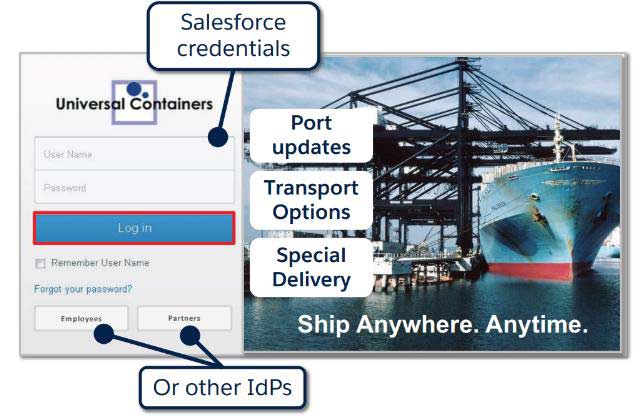
Personalization of the Login Process: My Domain
Definition: Allows for the creation of a unique URL for your organization.
Enables
- Sending a user to a provider of identification.
- Support for single sign-on started with SP
Provides:
- The option to assign a unique URL for single sign-on users, allowing others to continue using the standard login page.
- An enhanced user experience, including accessing “deep links” into their environment using SSO.
My Domain must be deployed for desktop and mobile apps to benefit from SAML.
My Domain’s Needs

- My domain cannot be undone, nor can its name be changed once deployed.
- Only one My Domain is permitted per Salesforce organization.
- There are distinct domains for Salesforce Communities.
Extra Benefits of Using My Domain
- You may use My Domain to:
- Add your branding to the login page.
- Give users a variety of login choices.
- Maintains deep connections throughout upcoming migrations and organizational splits.
What is SAML?
Definition SAML: Security Assertion Markup Language
- In another context, it is a standard for logging users into apps according to their sessions.
- An identity provider, which generates assertions, and a service provider, which consumes assertions, exchange authentication and authorization data via an XML-based standard.
- SAML is a single sign-on OASIS standard.
SAML Terminology
- SAML Roles
- SAML Assertion
- SAML Response
3 Roles in SAML
- User
- Identity Provider
- Service Provide
Identity Provider
The IdP is the provider of Assertions
Real Life Providers
- Okta
- Ping
- Identity Connect
Mock Providers
- Axiom
Identity Connect
Salesforce administrators can automate Salesforce user management by applying all the data gathered in AD using Identity Connect, a Salesforce Identity product. Changes in AD are synchronized in seconds.
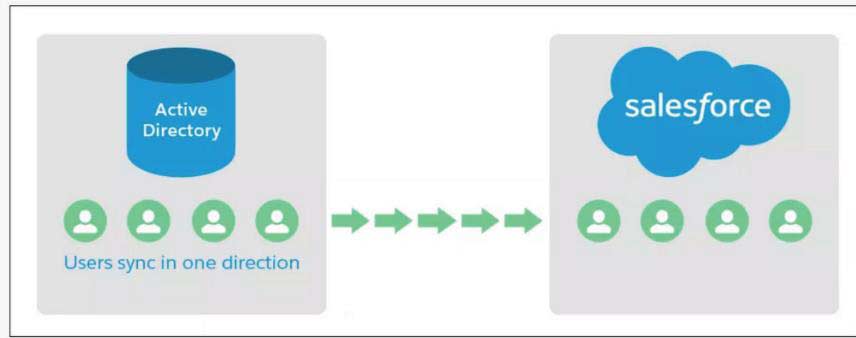
Identity Connect
You can rapidly set up users with Salesforce using Identity Connect.
Identity Connect can set up single sign-on (SSO), allowing users to access Salesforce using their Active Directory (AD) login information.
Service Provider
The application in question is a service provider. It may be cloud-based or on-premises.
Eg.
- Salesforce
- Concur
- Workday
- Office 365
Life before SAML
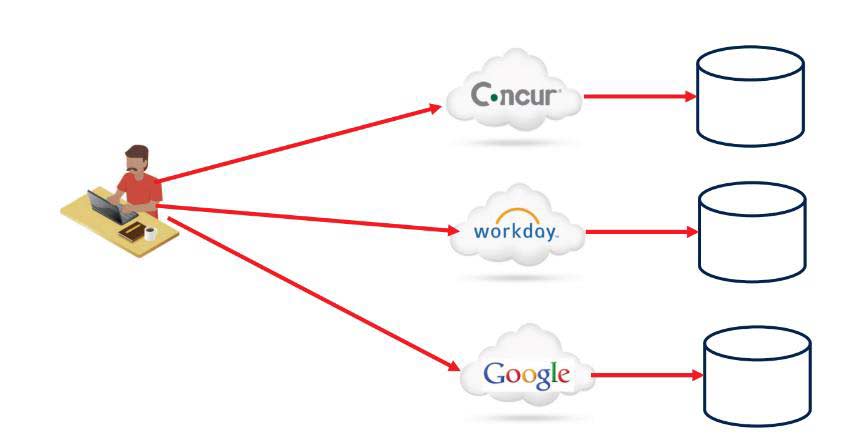
Life After SAML
The foundation of SAML is trust. How is trust built between the identity provider and the service provider?
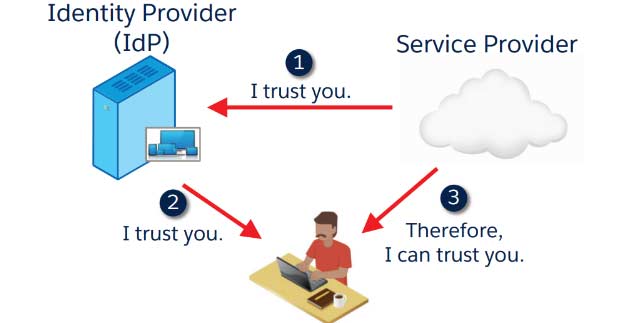
Enabling SAML aims to build trust between the Identity Provider and the Service Provider.
How is the identity provider trusted by the service provider?
The IdP provides Salesforce with its public key certificate during configuration.
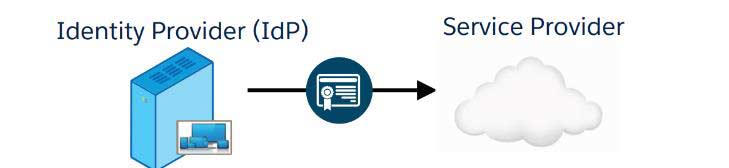
Salesforce verifies that the digital signature came from the IdP during runtime using the certificate.
- There is no password sharing between systems.
In SAML, what is an assertion?
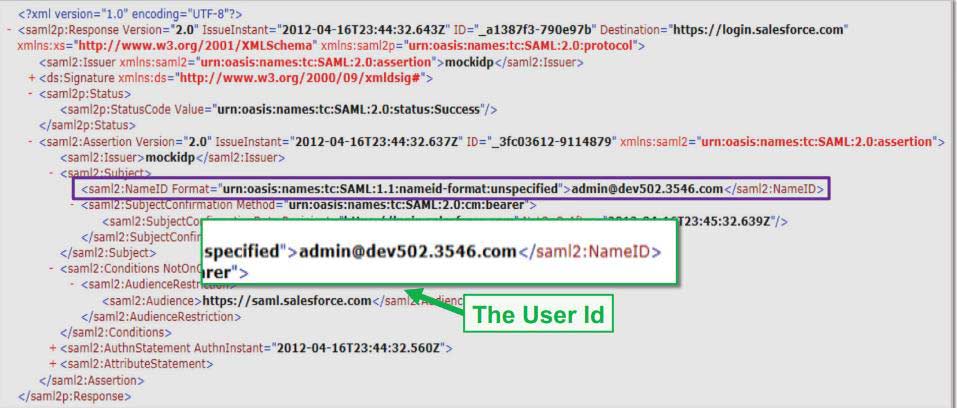
An IdP directive confirms the legitimacy of the user.
The digital signature of the Identity Provider.
Issuer: The Identity Provider’s name.
Entity Id: The service provider’s name.
The Subject: Salesforce username and user ID. bmarinova@universal-containers.org, for instance
OR
- A Federation ID, a login that applies to the entire company.
- UNIVERSAL CONTAINERS, for instance
What is the appearance of a SAML assertion?
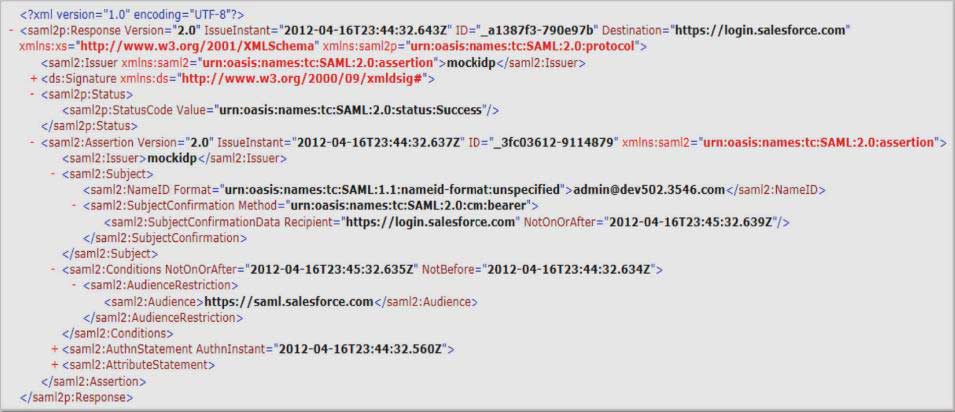
The Digital Signature
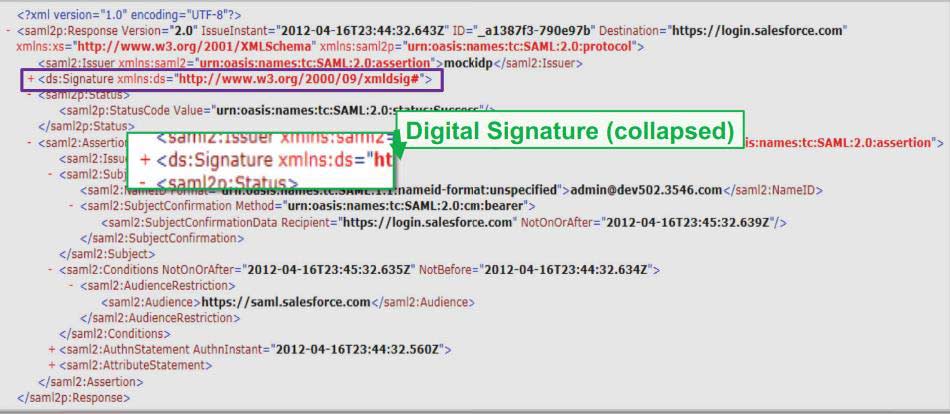
The Issuer
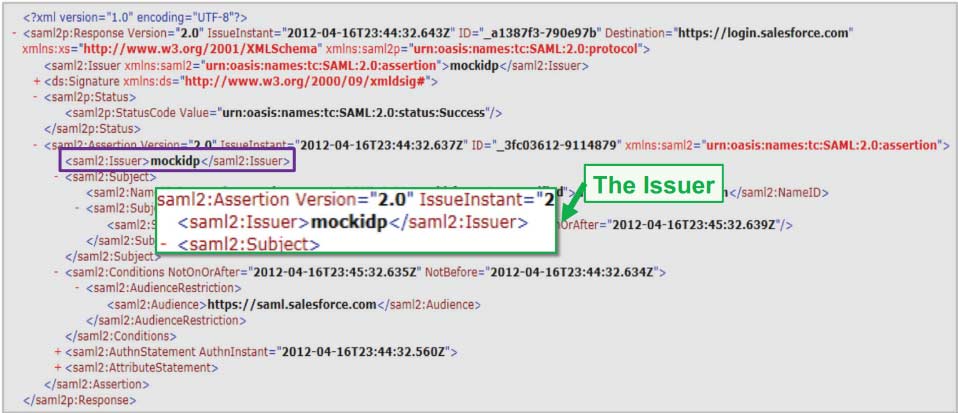
The User ID
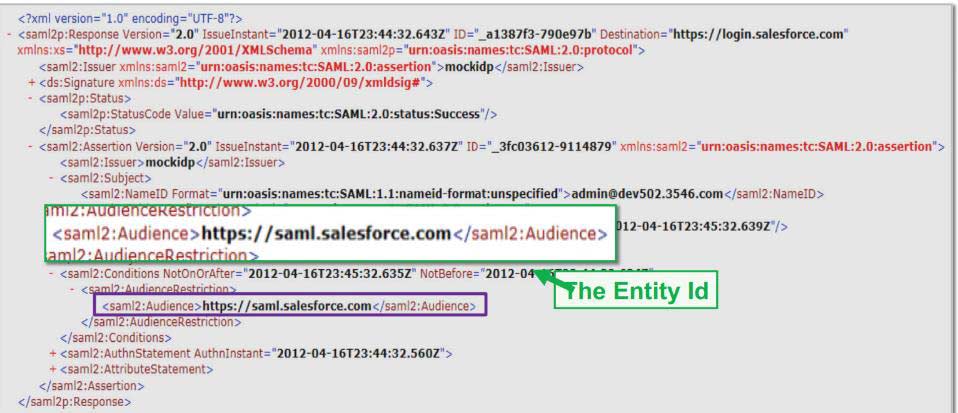
The Entity ID 
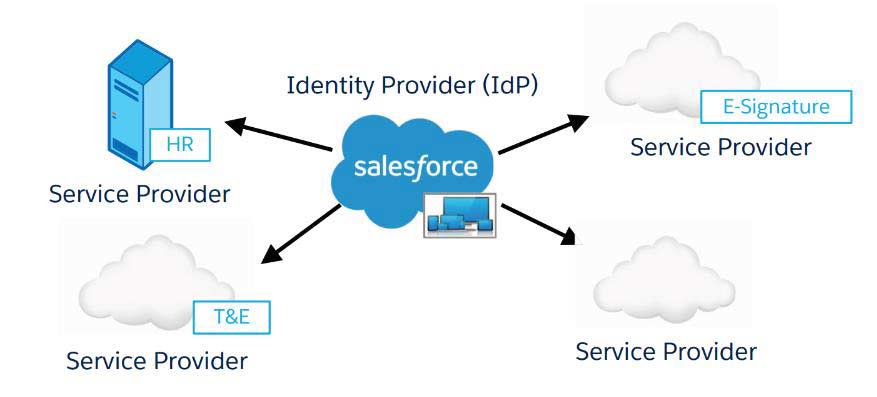
Salesforce as Identity Provider
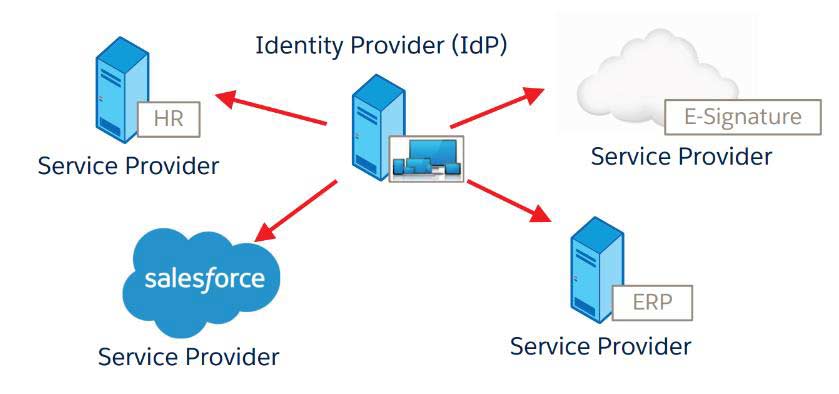
Salesforce as a Service Provider
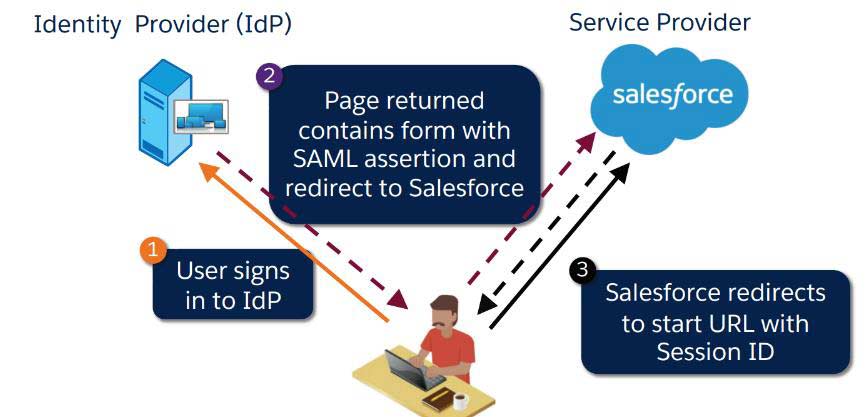
IdP initiated the SAML flow using Salesforce as the Service Provider (SP).
The SAML Flow was initiated by the Service Provider (SP) using Salesforce as the identity provider.
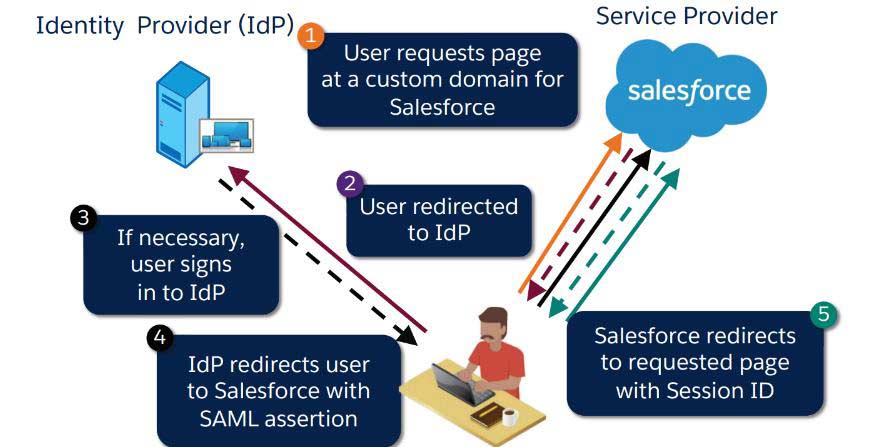
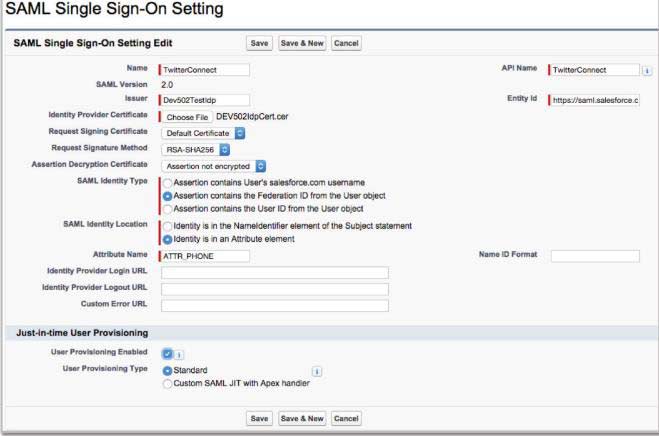
Service Provider: How is SAML configured?
- It is optional to specify the value to be used as the Federation ID.
- Acquire a certificate of verification.
- Configure the SAML assertion’s URL.
- (Optional) Enter the value to be used as the Federation ID.
- Attach the certificate of SAML verification.
- Get the SAML assertion URL.
- (Only Flow Started by the Service Provider) Create a unique domain.
How does your organization enable single sign-on (SSO) using SAML?
It needs to be activated for your company:
Configuration | Security Measures | Single Sign-On Configuration
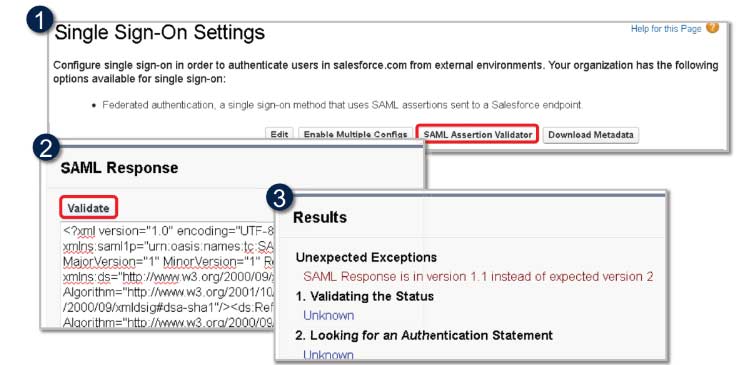
Troubleshooting Your Implementation
To verify the claim made by your identity provider, use the SAML claim Validator.
If there are several organizations, how does SAML operate?
- It only requires configuration to add more organizations to single sign-on using SAML.
- Numerous topologies might be used:
- Several service provider organizations and a single enterprise identity supplier.
- Some organizations act as service providers, while others serve as identity providers.
Salesforce as a Just-in-Time Provisioning Service Provider
JIT Provisioning creates and updates Salesforce user records using attributes in the SAML assertion.
At the very least, the SAML assertion has to include:
- Email address,
- last name, and
- profile ID, which is a 15-character ID or profile name
- UserName
is one of the optional attributes that may be included.
- Name, phone number, manager, etc.
Things to think about when utilizing SAML
- SAML and delegated authentication can be combined.
- Users can still log in using conventional techniques.
- No proxy server is necessary.
The Delegated Authentication Flow: What is it?
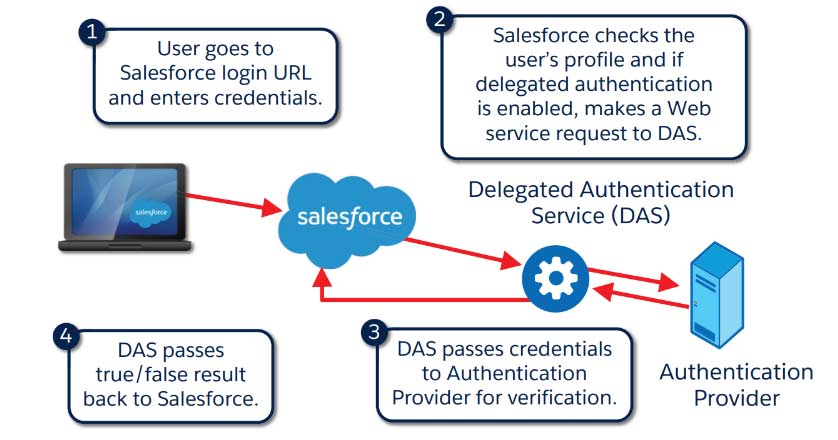
How is Delegated Authentication Implemented?
- Contact Salesforce to enable delegated authentication for your company.
- The AuthenticationService WSDL can be downloaded.
- Create a stub on the server side and include your own implementation.
- Specify SSO Gateway.
- Setup | Security Controls | Single Sign-On Settings
- Modify Profiles.
- Setup | Manage Users | Profile
A Few Things to Think About When Using Delegated Authentication
Salesforce transmits user credentials to DAS in an encrypted format.
Note: Salesforce does not store, log, or view passwords. It is disposed of immediately after the procedure is over.
Tokens can be used in place of or in addition to passwords when configuring the Salesforce-delegated authentication authority.
Salesforce needs an accessible proxy server.
- Cost, infrastructure, security (open firewall ports), and DMZ.
Delegated authentication is profile-based.
• You can selectively disable groups of users if needed.
You must have a valid certificate if you connect to the authentication service or proxy using Secure Sockets Layer (SSL/HTTPS).
Recognizing the Social Sign-on use cases
Being aware of the Social Sign-on use cases
- Social sign-on can be used by partners and customers while accessing websites or communities.
- Workers may log in to their organizations using My Domain and social media accounts.
Overview of the Social Sign-On Process
- The user attempts to log in to Salesforce using an external third-party identity.
- The user attempts to log in to Salesforce using an external third-party identity.
- The user is granted access after completing the third-party login procedure.
- The user is granted access after completing the third-party login procedure.
- The SF account is created or updated by the Salesforce Apex Registration handler.
- The user is currently logged into Salesforce.
Setting Up an Authentication Source
- Before setting up social sign-on in your organization, you need to either create an application with your identity provider or
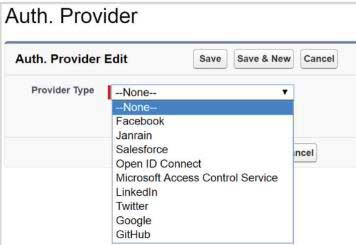
- In your Auth. For provider setup, select values that are maintained by Salesforce. Salesforce eliminates the requirement for you to develop your own application by using its default application in the background to generate the information.
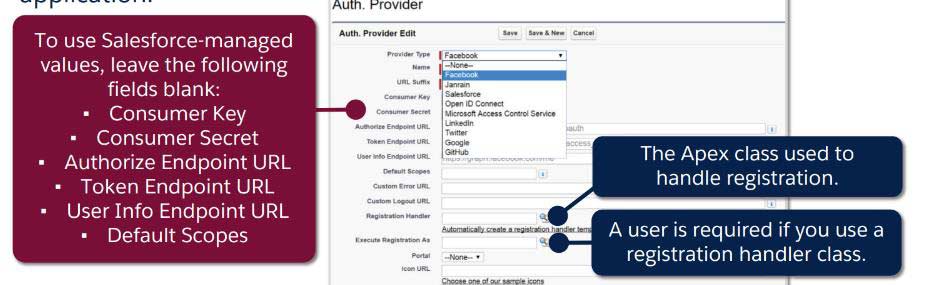
Examining the Authorization Provider
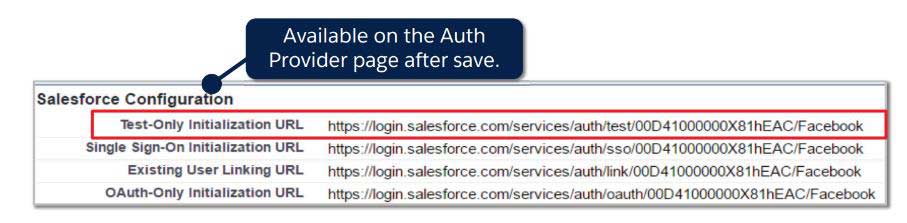
To make that your configuration has been set up correctly, use the Test-Only Initialization URL.
- Returns your identity provider’s basic user data after the external service has properly authenticated.
- Doesn’t allow you to access your community or organization.
- Even if your registration handler class contains logic to create users, it does not execute it.
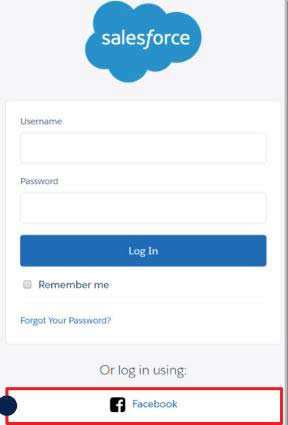
Connecting Your Social Account to Your Salesforce Account
Utilize the Existing User Linking URL to connect your social media and Salesforce accounts.

Go to Connections in your Salesforce personal settings at any moment to remove access.
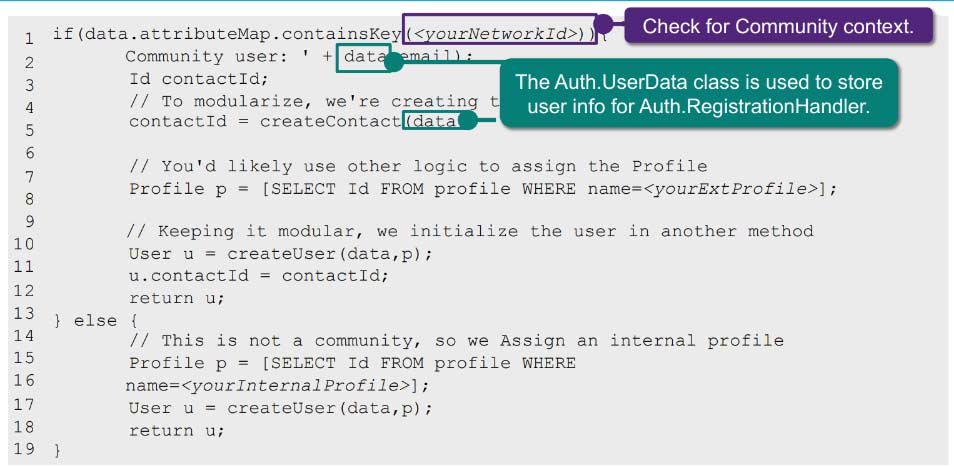
The Apex Registration Handler: What is it?
- Creates and updates user data as needed using data from the authentication provider.
- The Auth. The RegistrationHandler interface must be implemented, which specifies the createUser and updateUser functions.
SUCCESS BOOST!
Use a custom exception to display an error message on the page to the user. Otherwise, the error code appears in the URL
In what ways may the registration handler promptly create community users?
Authentication Provider
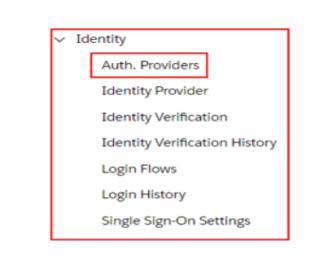
Thanks to authentication providers, users can access your organization using alternative login credentials, such as their Facebook or Gmail account.
The abbreviation for Authentication Provider is Auth. Providers.
Review
- SAML
SAML Request
SAML Response
SAML Assertion
SAML Assertion Validator
- SSO
- SSO SAML Settings Page
- MyDomain
- Identity Provider
- Service Provider
- Idp initiated SSO
- SP initiated SSO
- Salesforce as Service Provider and Heroku as Identity Provider
- Salesforce Org 1 as Identity Provider and Salesforce Org 2 as Service Provider
