
How to Analyze Salesforce Licenses and Users
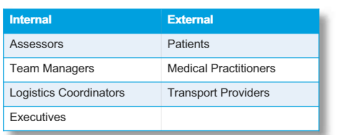
How to Identify the Stakeholders
- Who are the external (like partners or customers) and internal (like staff) stakeholders?
- What kind of features are they going to require access to?
- Who will utilize Salesforce—internal or external?
How to assign license types to users
- Which edition and product of Salesforce provides the necessary functionality?
- Which licensing schemes are available for the Salesforce products that have been identified, and how do they differ from one another?
- Which one should you designate for every sort of user or stakeholder?
- Additionally, consider licensing for your solution landscape's non-Salesforce components.

Customer Support Agents | Support Supervisors
USE wants to make sure that the right agent receives service requests. Agents can handle three conversations or one call at a time.
SLAs that have been agreed upon with brokers and listed entities must be strictly followed by the service team. Different first response and resolution times are determined based on the SLA (Gold, Silver, Bronze), and the highest service tier offers support outside of business hours.
Every case that a person creates must be visible to them using an online form, chat, phone, or Facebook Messenger.
Why Service Cloud – Not Just Cases
Business Development Managers | Sales Manager
BDMs have varying commission plans and sales targets because USE operates in several locations.
Sales managers give their BDMs goals, and in order to make sure those goals are reached, they need tracking tools.
Why Sales Cloud – Territory Management & Forecasting
Operations
Operations team members are responsible for all matters connected to HR, day-to-day productivity development and market announcements. When an announcement is lodged, internal operations team members examine and approve the releases before they are published publicly.
Why Platform – Only Custom Object & Approval Process
Executives
Globally, executives monitor sales and service data.
Executives are interested in their revenue from hardware equipment sales, reseller service royalties, and trade royalties.
Executives are interested in learning more about service SLA infractions and quota slippage.
Why Sales & Service – Forecast & SLA Reporting
Listed Entities
Companies that issue publicly traded equities are known as listed entities. There are various user kinds with varying privileges, much like brokers.
Listed entities may have more than one position, with the administrator having the same rights as a broker administrator. Nonetheless, announcements are filed by company secretaries.
One person can play several functions and wear several hats in a brokerage and listed entity firm.
A chart that displays the quantity of trades made for the company’s stock over the last five, thirty, and ninety days is what company secretaries want to see.
Why CC+-Charting & Advanced Setting
Brokers
Although they are unable to view brokerage-related data, administrators can control all user permissions within their account. An administrator can grant other users access to their company and designate their function.
In order to give brokers greater insight into their relationship with USE, USE would like to present a visual representation of the weekly case volume, assets held, and upcoming contract renewals.
Why CC+-Charting & Advanced Sharing
Individuals
As a result USE have expanded to over 400 listed companies, 600 brokers and over 3 million users and expect to grow by 25% year on year. users must be able to access all cases they made via either an online form, chat, phone or Facebook messenger.
Why CC – Over 2m Members & Basic Sharing
Resellers
Resellers who sell gear in data centers in collaboration with USE’s BDMs.
In addition to working with BDMs to create quotes, resellers asked for a shared platform where they cou
ld add lines for their services. Resellers are pleased to pay 10% royalties for their platform services.
Why PC – Opportunity Creation
Website Visitors
‘Get in Touch’ and ‘I need help’ forms can be filled out on this custom page, which also features static information. Currently, a shared email inbox receives the forms. Employees at USE are griping about one another, saying that no one tells anyone if they have previously gotten in touch with someone. Additionally, USE is eager to provide a website login feature to the new system.
Why None – Web Forms and Login Button
License Summary

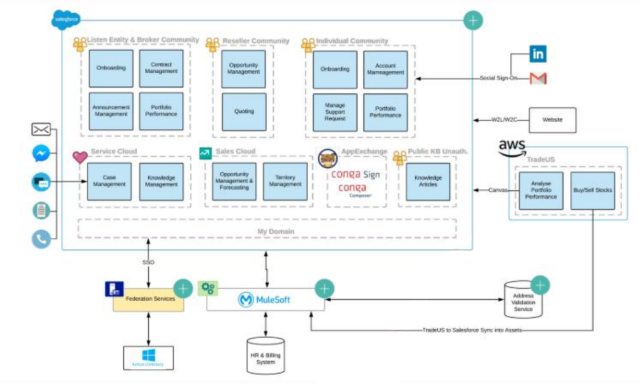
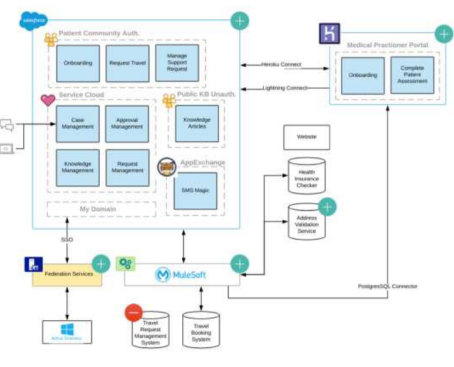
Creating the System Landscape
System Landscape – Revisit the Example
Important elements (apps and systems)
- Existing, novel, and decommissioned
Important Salesforce actors and licenses:
- the license(s) are used by the actor?
- One or more organizations
Important third-party programs or systems
How will the data be migrated—initial or ongoing?
Domain Architect Workshop: Application
System Landscape – USE