



Have you ever wondered if additional apps can be integrated into your Salesforce org?
If you have been asking this question, then you are at the right place looking for a solution. Since you are aware of the various applications at AppExchange, Salesforce helps integrate them. This Salesforce integration gives you a 360-degree, real-time picture of your consumers by centralizing your data. It decreases the need for manual input, automates procedures, and gets rid of data silos.
As a result, operations will run more smoothly, teamwork will improve, and customer encounters will be more meaningful. You can turn these obstacles into opportunities by integrating Salesforce, which will increase the effectiveness, efficiency, and customer-centricity of your company. To learn more about the new possibilities for your company and how to easily connect Salesforce with your existing systems, read this blog.
What is Salesforce Integration?
Salesforce integration connects and manages several applications on one platform, i.e., your Salesforce org. Any enterprise or SMB needs several applications that help in the various day-to-day operations of their business. This will help manage data and information easily through various systems.
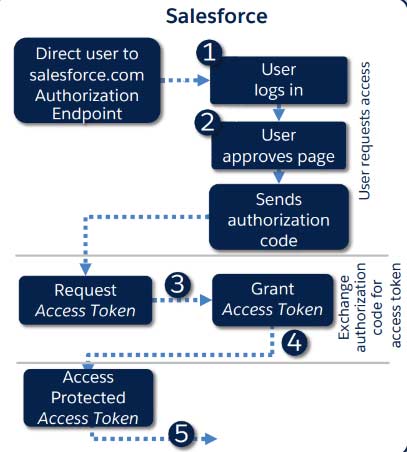
Salesforce consulting services in the UK help increase productivity, optimize processes, and enhance customer experiences. Businesses guarantee smooth data flow by integrating Salesforce with ERP, marketing automation, and customer support platforms, which lowers errors and human labor. Integration also results in better sales and marketing performance since it facilitates real-time insights, streamlines processes, and improves decision-making.
Integration Capabilities Offered by Salesforce
Salesforce offers several integration capabilities. There are several advantages to integrating with your existing systems that can revolutionize the way your organization operates. Below are a few capabilities that are integrated with Salesforce:
SOAP API
SOAP stands for Simple Object Access Protocol. SOAP API helps access data through the Salesforce platform. This data is extracted through simple, powerful, secure application programming interfaces.
Two of the SOAP API’s key benefits are its ability to handle many records in a single request and support for complicated data types. This makes it an excellent option for scenarios requiring you to work with a lot of data or execute several tasks simultaneously.
Streaming API
With the integration of the streaming API, businesses receive real-time notifications about changes in Salesforce data. The Salesforce Streaming API pushes data to the client using a publisher-subscriber (pub/sub) architecture.
When you need to employ PushTopic events and Change Data Capture events to keep your external source in sync with Salesforce data, you use the Salesforce Streaming API. Using the Salesforce Streaming API, you can respond to Salesforce data changes by processing business logic in an external system. With platform events and generic streaming, we may broadcast personalized alerts using the Salesforce Streaming API.
REST API
REST API, also known as Representational State Transfer Application Programming Interface, is a service that provides programmatic access to your data in Salesforce. This helps users with performing complex operations on a large scale.
Because REST technology is more straightforward, adaptable, and requires less bandwidth than the more reliable Simple Object Access Protocol (SOAP) technology, it is typically chosen for internet usage. It is employed to retrieve or provide data from a web service. Only HTTP requests are used for all communication when using REST APIs.
Platform Events
Platform Events communicate real-time event data between external apps and Salesforce business processes. Since it uses a push/subscribe model, it significantly reduces the need for several point-to-point integrations.
Platform Events expedite the development. These modular components are quicker to construct than point-to-point integrations and may also be applied to other integrations. The conventional method is not scalable and will compel Salesforce to use more API calls than it can handle as its structures get more intricate and expansive.
Callouts
In Salesforce, a callout is a request for data to be sent or received from an external system. Declarative tools or Apex code can be used for callouts. This technique stops a program’s execution flow.
An Apex callout allows you to seamlessly integrate your Apex with an external service by requesting an external Web service or submitting an HTTP request from Apex code and then getting the result. Apex facilitates integration with Web services that use HTTP (RESTful services) or SOAP and WSDL.
Heroku Connect
Heroku Connect is an add-on for Salesforce that enables real-time data synchronization between a Salesforce organization and a Heroku Postgres database. It lets you use Heroku’s capabilities and supported programming languages and frameworks to create custom applications that interact with Salesforce data.
Additionally, Heroku Connect uses Heroku External Objects to provide a data proxy to Salesforce via the OData protocol. The Heroku Postgres database, to which Heroku Connect keeps a connection, has an OData wrapper provided by Heroku External Objects. This functionality enables other web services to use RESTful endpoints created by the wrapper to retrieve data from within the designated Heroku Postgres database.
BULK API
When working with large amounts of data, BULK API provides a simple interface to load them into the Salesforce org. It is usually faster than SOAP-based APIs and more consistent and integrated than any other APIs.
Up to 15,000 batches may be submitted in a 24-hour rolling period. Every batch processed using either Bulk API or Bulk API 2.0 counts toward this allocation since both Bulk API and Bulk API 2.0 share it. Only ingest jobs use batches in Bulk API 2.0. Query jobs don’t.
Change DATA Capture
Every document changes at some point. Hence, change data capture (CDC) helps identify and track near-real-life changes and deliver them to a downstream process system.
Change Data Capture allows you to synchronize related records in an external data repository and receive real-time updates to Salesforce records. Events about create, update, delete, and undelete operations in Salesforce records are published by Change Data Capture.
Given the different integration capabilities offered by Salesforce, let us now understand why Salesforce API Integration is needed.
Importance of Salesforce API Integration
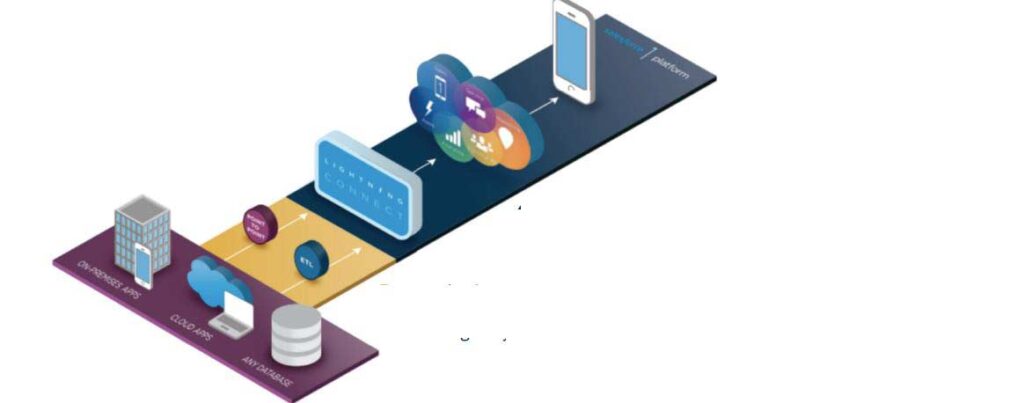
API, also known as Application Program Interface, is a software intermediary or a middleman that allows application communication. Simply put, it is a set of instructions that the client and the server can identify. One of the main reasons why APIs are used is because they help develop robust applications. Further, it improves functionality, increases security, accelerates better performance, and enhances user experience.
Prioritizing APIs from the start of the software development process, often known as the API-first strategy, positions APIs as the fundamental components of software. API-first companies don’t treat APIs as afterthoughts; instead, they create them before building other applications.
How Salesforce API Integration helps businesses?
Businesses benefit from Salesforce API integration, which allows for real-time data synchronization, workflow automation, and a smooth connection between Salesforce and other apps. It also improves the customer experience by offering a 360-degree perspective, fostering better teamwork, and increasing sales and marketing effectiveness.
Through the integration of analytics technologies, businesses can improve their decision-making by gaining important information. This makes operations more efficient and prepared for the future by supporting scalability, guaranteeing data security, and assisting in meeting compliance standards like GDPR. Prioritizing APIs from the start of the software development process, often known as the API-first strategy, positions APIs as the fundamental components of software. API-first companies don’t treat APIs as afterthoughts; instead, they create them before building other applications.
- Reduces manual labor and boosts productivity by automating processes.
- It gives a cohesive picture of interactions, which improves the customer experience.
- Enhances data accuracy through cross-platform real-time synchronization.
- Integrates with social networking, e-commerce, and email platforms to increase marketing and revenue.
- Centralizes data, which improves team cooperation.
- Makes data-driven decisions possible through sophisticated reporting and analytics.
- Supports scalability by adjusting to new integrations and business expansion.
Conclusion
Salesforce’s extensive integration options allow businesses to increase overall productivity, improve data accessibility, and streamline processes. These integration techniques provide smooth communication between platforms, whether through the use of tools like Salesforce Connect and Heroku Connect, the synchronization of real-time data with platform events, or the connection of external systems via APIs.
Salesforce consulting services in the UK create more adaptable and scalable systems that improve user experience and performance by giving APIs top priority. Organizations can rely on Salesforce consultants in the UK to optimize the potential of their Salesforce ecosystem by comprehending and implementing the appropriate integration strategy.

Are you looking for a Salesforce consultant in the UK to help you with Salesforce integration services?
Book a call with us right now.
Rate the article